





How Many dB is a Quiet Fan?
Understanding the sources of fan noise, measurement methods, and the relationship between dB levels and actual perception can help you choose a quiet fan suitable for your environment, whether it’s a bedroom, office, or PC cooling setup.
This article mainly covers noise measurement standards and decibel perception, and compares the noise performance of different fan types in real-world scenarios. It helps you fully understand how to select an efficient, low-noise fan, ensuring your space remains both comfortable and quiet.
Noise Levels of Quiet Fans
Fan Type / Environment | Noise Level (dB) |
Ultra-Quiet PC / Desktop Fan | 10–20 |
Quiet Pedestal / Room Fan | 20–30 |
Low Noise (Maximum Settings) | 30–40 |
Whisper | ~30 |
Typical Indoor Environment | 40–50 |
Noise Measurement Standards for a Low Noise Fan
The noise level of a fan, including a low noise fan, is usually measured in decibels (dB). When assessing and interpreting fan noise, there are several key points to keep in mind:
1. Measurement Distance
Fan noise is typically measured at a distance of 1 meter, simulating how a person would perceive the sound in normal usage conditions. For a low noise fan, it’s important to remember that perceived noise decreases as the distance increases, so the measured value may not fully represent the sound level experienced throughout an entire room.
2.Differences in Measurement Methods
Cooling fan can be measured in different ways depending on the manufacturer or testing standard. Factors such as instrument type, background noise, and the acoustic properties of the test environment can affect the results. This means the same fan may show slightly different dB values in different tests.
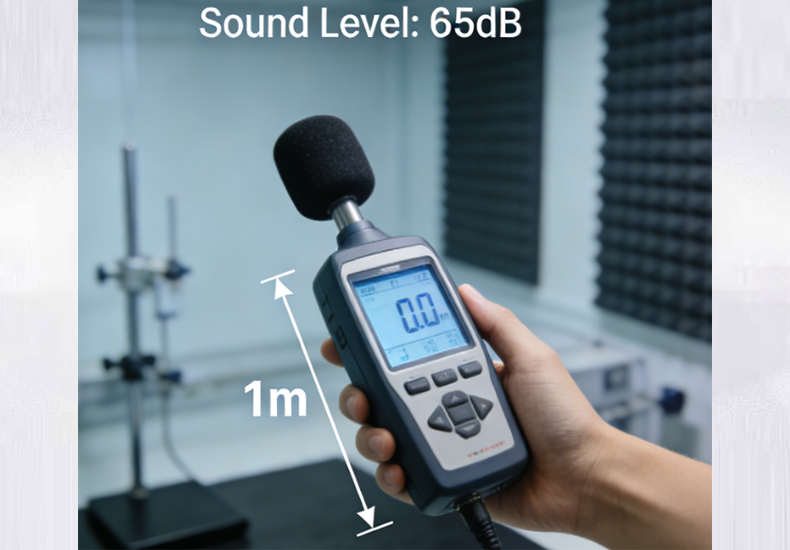
For example, YCCFAN tests its low noise fans in an anechoic chamber following standards like ISO 3745 / GB4214‑84. Under these conditions, a typical YCCFAN quiet fan measures 35.7 dBA (peak 38.5 dBA) or 37.9 dBA (peak 40.5 dBA) at 1 meter. Smaller fans, like the 35×35×7 mm blower, measure between 21.3–29.3 dBA.
These test results give a clear view of a fan’s noise performance. Knowing the measurement methods and actual dB values helps users compare fans and choose a truly quiet, reliable fan.
3.Decibel Perception and Noise Standards
Decibels (dB) measure sound pressure on a logarithmic scale. An increase of 10 dB represents roughly a tenfold rise in sound intensity, though the human ear often perceives it as a doubling in loudness. Small differences in dB can noticeably affect comfort, especially in quiet environments such as bedrooms, offices, or libraries. Even a 3–5 dB change can impact focus and overall experience.
4.Noise Reference for Silent Cooling Fans
Home and Office: Fans under 50 dB are generally comfortable for daily use without causing disturbance.
High-Requirement Environments: Bedrooms, studios, or PC setups benefit from fans rated 30–35 dB or lower, helping maintain a calm, comfortable atmosphere.
Professional Applications: Ultra silent cooling fans for electronics or PCs can reach 10–20 dB, suitable for recording studios, labs, or other noise-sensitive environments.
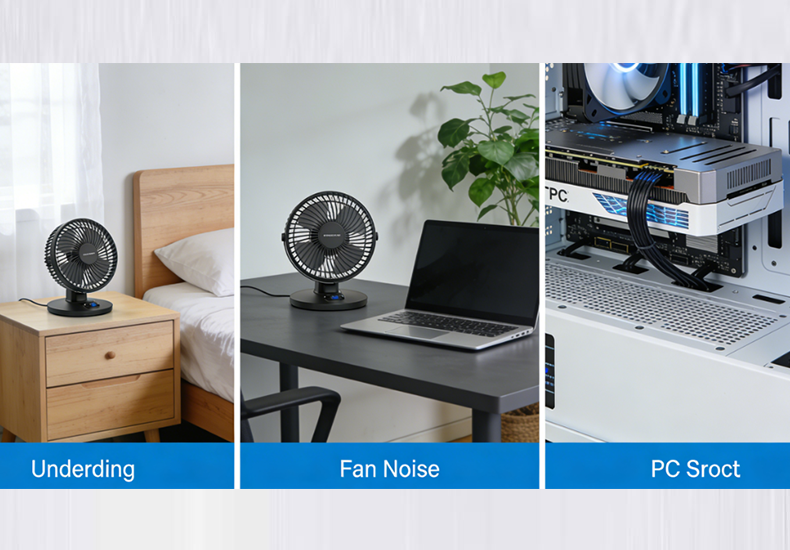
Selecting a fan with the right noise level ensures effective cooling while keeping the space peaceful and comfortable.
User Perception and Usage Scenarios for Quiet Fans
Cooling fan directly affects user experience, and different dB ranges correspond to different perceptions and suitable applications for a quiet fan:
10–20 dB: Almost silent and barely noticeable. Ideal for nighttime work, sleep, or very quiet environments. Quiet fans at this level use ultra-quiet designs and can run for long periods without disturbing rest or focus.
20–30 dB: Light airflow sound that can be heard but does not interfere with daily activities. Suitable for bedrooms, offices, or study rooms. A quiet fan in this range provides stable cooling and maintains a peaceful environment.
30–40 dB: Noticeable wind sound. Suitable for living rooms, kitchens, well-ventilated spaces, or areas needing higher airflow. This noise is generally acceptable for daily activities but may be noticeable when sitting close to the fan.
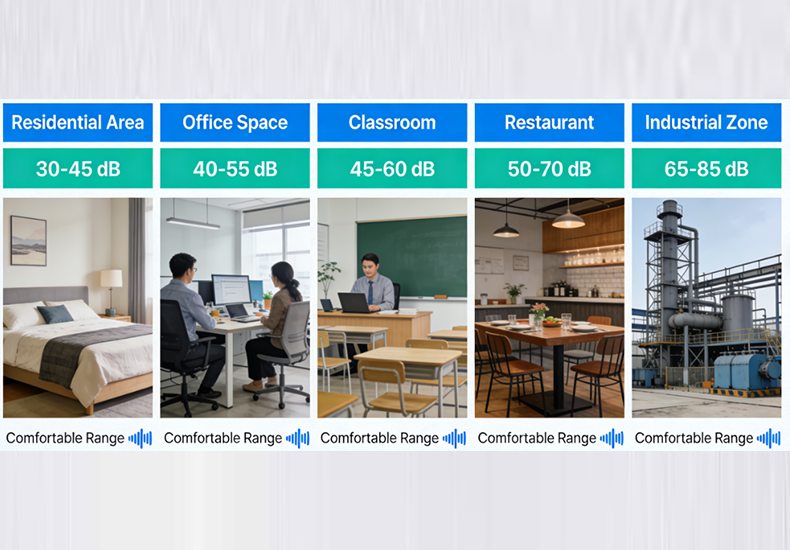
Choosing the right quiet fan for your environment ensures efficient cooling while keeping the space comfortable and peaceful.
How to Choose a Truly Quiet Fan
1.Check Official Noise Ratings (dB)
Start by reviewing the official noise specifications when selecting a quiet fan. YCCFAN measures fan noise in an anechoic chamber following professional standards such as ISO 3745 / GB4214‑84. This ensures accurate and reliable dB data, giving users a clear picture of the real noise level.
2.Prioritize Ultra-Quiet or Low-Noise Settings
For noise-sensitive spaces, choose fans rated below 20 dB or models with low-noise settings. YCCFAN’s ultra-quiet PC fans and small blower fans operate between 10–30 dB. They are ideal for bedrooms, offices, or PC cooling setups.
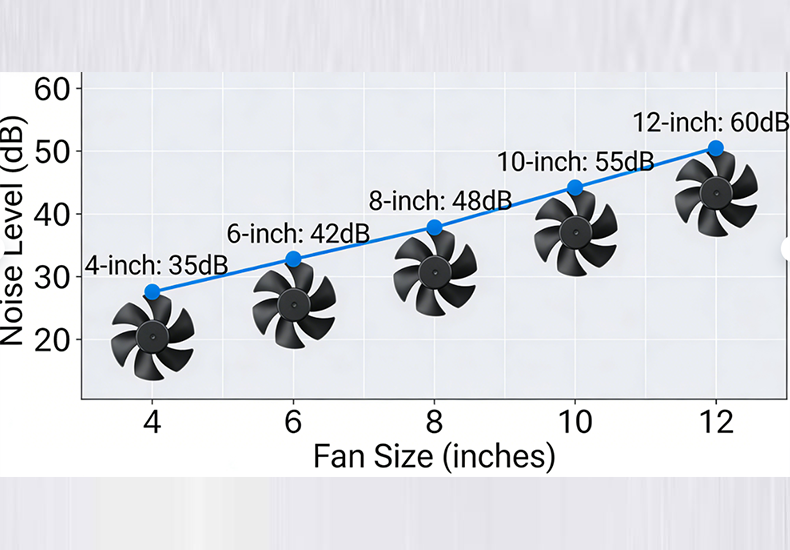
3.Consider Fan Size, Speed, and Placement
Fan size, speed, and placement all impact perceived noise. Generally, a larger fan running at low speed is quieter than a smaller fan at high speed. With YCCFAN’s range of sizes and models, you can select a fan that offers efficient cooling while keeping noise minimal.
Read more:
https://www.yccfan.com/articledetail/how-to-choose-a-truly-noiseless-cooling-fan.html
https://www.yccfan.com/articledetail/precision-manufacturing-in-industrial-cooling-fans.html
Conclusion
Choosing the right quiet fan not only ensures efficient cooling but also keeps your work, rest, and daily activities undisturbed. YCCFAN offers a range of high-performance quiet fans, all tested according to professional standards with reliable noise data. Contact us today to explore ultra-quiet PC fans, blower fans, and low-noise models, and make your space both quiet and comfortable.